Showing posts with label content strategy. Show all posts

Monday, 29 January 2018

User centric digital learning and development

How we’ve made our learning content easier to find and easier to use. Without using a learning management system.


In the Talent and Development team at Cancer Research UK we want people to spend less time searching for our learning content, and more time using it to help us beat cancer sooner.

In this post we’ll share how we’ve made our learning content easier to find and easier to use, and what we’ve learned along the way.

We’d love to hear from you if you’re doing anything similar, have ideas to share, or any questions.

People search online to learn
As this great post by Kallidus points out:
  • “80% of people say Google or other search engines are vital to learn what they need to do their job”.
  • “Just 28% of people start their search for learning using their organisation’s LMS”.

What does this mean for Learning and Development (L&D) teams?
At Cancer Research UK we’ve taken 3 main lessons from this:
  1. As an L&D team, we can’t control how or when people learn.
  2. We could help people find useful stuff quickly by curating great content.
  3. When we want people to see our own content, we need to make it easy to find and easy to interact with. Otherwise people will give up or not even bother looking for it in the first place.
Our team has worked hard over the last couple of years to create and curate some great learning content for people to access. Like guides, videos, online discussion groups and workshops. So we decided to see how easy we could make it for our users to find.

Here’s how we’ve done it:

1. Joined forces with our Digital and Internal Communications teams

Internal Comms, because our learners’ ability to find and use digital learning content is part of their overall experience of using our internal digital platforms at Cancer Research UK. And Digital, to give us some guidance on how people use online content.


2. Started with our users

Our starting point was to understand how people found our content and what their experience was when they got there. We mapped this out with a lot of post it notes, and decided what we thought were the main pain points:
  1. People struggle to get to the learning content they want. They often end up landing on the wrong system. Then they get annoyed and do something else.
  2. If people do get to the right place (our main learning pages), they are confused by lots of words, fonts and colours. Plus the landing page content mainly promotes face- to-face sessions, most of which were fully booked. Not the message about self-directed learning that we want to send. So they get annoyed and do something else again.

3. Tested early with users

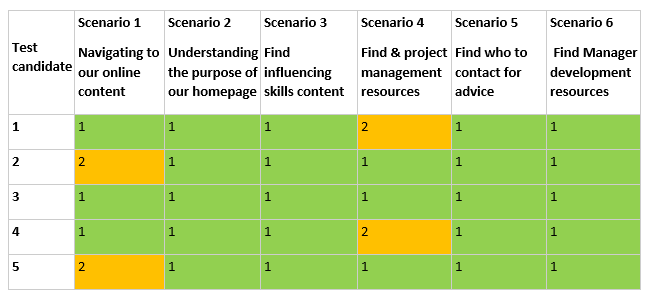
To validate our assumption that we should start by fixing these problems, we ran some usability testing. I’d highly recommend doing this. It involves getting users into a room and asking them to do some typical tasks on your system. We watched, took notes and gave them a score of 1-3 depending on how easily they could complete the task. An ‘X’ means they couldn’t do it at all.

Here’s how people got on:


People used these words to describe the page:
 

And the pages scored an overall usability score of 44.5/100. To put this in context, average is 68 and an ‘A grade’ user experience (UX) is 80.


4. Designed some new content

So we knew we needed to improve our pages. We used a digital copywriting technique, ‘KFC’ (Know, Feel, Commit). This was new to our team, and having got over the Zinger Burger cravings, we now swear by it.

First write down on post it notes everything you want your user to ‘Know, Feel and Commit to’, as a result of reading your content. Stick the post its up in a table on a flipchart.

Next, take all the post its from the ‘Know’ and ‘Commit’ columns and plot them on a Business/ User need grid.

Here’s what we put together for our new home page:


Focus: high user need and high business need
This stuff should go at the top of your page.

Guide: high user need, lower business need
This stuff should go second highest on your page.

Drive: high business need, lower user need
This stuff should go third highest on your page. You want them to read or do it, but it’s not primarily what they’re looking for.

Meh: low user & low business need
This stuff should go at the very bottom. It isn’t useful to anyone but has to be included, like terms and conditions.


5. Went where our users were

We had to work out where to host our content. To this point we’d had everything on a Sharepoint site dedicated to learning. But we decided to change to the place we knew that our users go most and feel most comfortable. To reduce the separation between 'learning' and 'work'. As David James puts it in  this post:

"It is often confused that L&D's clients are Learners, when in fact they are Workers."

We’re lucky to have a trusted intranet that’s been built with users in mind and has great search capability. It's hosted on the content management system, Drupal. So we tested what would happen if we put our new content on the intranet.

To give an idea of how much we changed things, here’s the home page that we started with:


And here's what it looks like now:


6. Usability tested again

Our hunch was that the new pages would be easier to find and more usable. We ran some more usability testing to find out. And we saw a massive improvement:


People used these words to describe the page:


And the overall usability increased to 77.9/100, well above average and not far off the UX gold standard of 80. A great improvement from a couple of weeks’ work.


7. Writing for the web

We’re now improving the rest of our pages using the KFC process and the tips that we’ve learned from our digital content team.

Before we start on content for any topic, we get hold of a list of people we know have come to a session on that topic. We ask them what they wanted to learn and why. Their answers help us structure our content by what our users want to hear, rather than by what we want to tell them.

An example from our personal resilience page:


What’s next?

We know from our testing that our pages are now easier to find and more usable. So people waste less time searching for learning content, and can spend more time doing jobs to help beat cancer sooner. Early signs are that more people are accessing the pages too. We're gathering qualitative feedback and continually improving the content.

We're also looking at learning management systems to help us recommend content and training to staff. But any new system needs to enhance the existing user journey, not replace it. It has to work for the user or there's little point in having it.

As anyone who’s read anything by Jane Hart will know, modern workplace learning is much more than making existing learning opportunities ‘digital’. We need to help people take control of their own learning, not wait for it to be arranged for them.

All of our content aims to encourage this kind of behaviour. It won’t get us there on its own, but it will help if it’s easy for our users to find and easy for them to use.

Ed Willis
Learning Designer

Tuesday, 2 January 2018

Writing for the Web at Cancer Research UK

A few weeks ago at Cancer Research UK we had the 200th person attend our ‘Writing for the Web’ course. After celebrating with a ticker-tape parade and a commemorative Twix, it got me reflecting on the course, and why we started running it in the first place.

We’ve written a bunch of stuff about our digital devolution model, and how we aim to make digital a core part of everyone’s job at the charity. And a key part of this is how we communicate our brand online.

So my team started a 2 hour workshop for anyone who publishes content on our website. And, because we have the skills to deliver this internally, it means we can be flexible and run the course as often as needed - without spending money on external training providers.

So what’s covered?

Write the way your users read

Most people get that print and digital content are different. We understand that reading this blog on an iPhone is a fundamentally different experience than reading an article on copywriting in a magazine. 

But, what we sometimes don’t recognise is that as readers, we have fundamentally different attitudes to how we approach content in print and digital. 

Someone much smarter than me called Jakob Nielsen did a bunch of research using eye tracking software to record how people read content online.

He found that, whereas with traditional print content we (in European languages at least) read left to right and top to bottom, in digital we tend to scan around the page in more of an ‘F’ shape.


As users we go to websites with a specific problem, and we’re scanning the page to get the ‘gist’ of how well the page we’re on will solve that problem for us.

So our content needs to make it clear to users how we’re meeting their needs at a glance. They won’t take the time to wade through irrelevant or hard to understand information to get what they’re looking for. If they aren’t convinced our content will help them they’ll just leave.

Which is why we need to make it clear how our content will benefit our users.  

Write for your users, not for you

There’s an old saying in copywriting, “features tell, but benefits sell”. The idea is that just explaining what your product or service is won’t engage your users. Instead you need to explain how it will make your users’ lives better.

This is the most important thing about writing for digital. If you can relentlessly focus on how your content is going to help your users, rather than how your content is going to help your organisation, it’s the quickest way to improve its performance.

So what does this look like?

Well, imagine for a second you’re a humble pie maker, who wants to promote a competition on your website, www.piespiespies.com. 


You might use this as your opening line:

To celebrate 10 years in business, we’re running a competition to win free pie for a year.

Here, the focus is very much on your business. It’s a statement of fact, and it’s written from the perspective of your business. It’s feature-led.

Now imagine an alternative opening line:

Win free pie for a year with our anniversary competition.

Here the focus is on what the competition will do for your user. Does your user care that your business has been around for 10 years? Probably not. Do they care about free pie? Well, who doesn’t? So this sentence is more benefit-led.

Ok, great - but why is this important?

Well, think about it in context of scan reading. If a user’s quickly skimming your page, you’ll want to draw their attention to relevant content as quickly as possible. And they’re much more likely to engage if they can see, at a glance, what’s in it for them. 

Then, once we’ve got their attention, the next thing we need to do is make sure we express ourselves in a way that’s easy to understand. Which is where Plain English comes in. 

Write the way you talk 

Back when I started my career, I used to worry about how seriously people would take my writing. I used to think that to sound credible I needed to use lots of long, complicated words. After all, that would help me come across as smart and authoritative, right?

Well, actually, the opposite was true. By loading my writing with complicated phrases I wasn’t coming across as smart. I was coming across as confusing and difficult to understand.

Sarah Richards is another person much smarter than me, and she makes the point that writing in Plain English isn’t dumbing down content, it’s opening it up. Because if we know our users scan information online, and we know they react better to clear, benefit-led sentences, then why wouldn’t we try and make our writing as clear and concise as possible? 

At Cancer Research UK, our guidance on Plain English is pretty straightforward:
  • Keep your sentences short (20 words max) 
  • Use a maximum of 3 sentences per paragraph
  • Only discuss 1 thing per paragraph (it’s easier to scan that way)
  • If you have the choice between a long word, and a short word that means the same thing, then always pick the short word
If in doubt, a good rule of thumb is ‘write the way you speak’. This doesn’t mean talking the same way you would to your friends at Friday night drinks. Instead, think about how you’d explain your content to your users over a coffee and a Twix. What words would you use? How would you speak? 

I imagine you’d be friendly, straightforward and to the point. I also imagine you wouldn’t use phrases like ‘for further information please direct any inquiries to our helpline’. I mean, you might, but you’d come across as slightly robotic if you did.

A great tool you can use to check how clear your writing is, is Hemingway App. It’s a free, online word processor, so you can type straight into your browser window. And, as you type, Hemingway grades how easy your writing is to understand and suggests improvements. The lower the score the better, and if you aim for a score between 6 and 8 you’ll find your content is doing pretty well.

Write better by writing more often

This is just a snapshot of the content training we offer at Cancer Research UK, and as far as content strategy goes it’s one piece of the wider puzzle.

Before you sit down and create your content you’ll need to make sure it answers a clear user and business need. You’ll need to make sure it has appropriate governance so it doesn’t all fall apart once it’s been published. And you’ll need to make sure you regularly test it so you know it’s still doing the job it should.

However, what this training does give teams is a solid grounding in the skills they need for writing for the web. Will they create world class digital content straight away? Well, probably not – it’s kind of hard to after a 2 hour introduction course. 

But writing something that’s a solid base is a great first step. Then based on users’ feedback you can always improve, iterate and optimise your content over time. Plus, bear in mind the only way you’ll become a better writer is by writing. And if your content is in plain, straightforward English that speaks to your users’ needs, it’ll already be better than a lot of content online. 

Chris Flood
Content Strategy Lead

Monday, 31 July 2017

Making the move to agile ways of working

Starting at Cancer Research UK over 10 months ago, I had no idea what it meant to work in an agile environment. In all honesty, when I first heard the word agile, it conjured up images of sprightly employees making their way across the office, leaping through the air, before twisting and twirling into their designated meeting rooms. 


Realising I probably wasn’t quite grasping the concept, I decided to do some reading up before my first day. Article upon article told me that agile ways of working had sprung from thinking of new ways to manage software development projects which resulted in the creation of the ‘Agile Manifesto’. Surprisingly, unless someone was going to quiz me on the origins of agile, this didn’t really help me a great deal.  

There was only one thing for it, to get stuck in and learn as I went along. And that’s what I did. 

You won't have a clue what anyone is talking about...


… well for a few days (or weeks) at least.

‘So you’re used to waterfall ways of working then?’
‘Quick, it’s time for stand-up.’
Have you added it to the Trello board?’
'Are you working in Kanban or Scrum?’

Huh?!

As with any job you come into new, you soon realise that all the acronyms, jargon and technical terms that people throw around, are all just fancy words for something that’s not actually that complicated to get your head around.

Once you experience the tools, meeting and methods in practice, it all becomes a lot clearer and you soon get into the swing of things. And of course, when things don’t make sense, there’s always someone more than happy to explain it to you!

Your first stand-up will probably be a bit unnerving...


Stand-ups are a chance, usually once a day, for the whole team to meet for a quick status update and take place standing up (hence the name.)

My first stand-up experience, for want of a better word, was slightly unsettling. As each member of the circle declared to the group what they had worked on the day before and what they were planning to do the next, my turn crept closer and closer. As all eyes fell on me, two thoughts crossed my mind: 

  1. Why is everyone so happy to let everyone know what they’re working on?
  2.  I’ve not actually been here that long yet. What the hell am I going to say?!

First my defensive side came out. I was very much used to just getting on with a task and then delivering it and found the thought of sharing what I was working on very uncomfortable. Why did everyone else need to know? Why does it matter to them?

Then my self-conscious side came out. What if they thought I wasn’t doing enough? What if I worked on a different project the day before and hadn’t anything to say the team whose eyes were now fixed on me?

What I soon learnt was that stand-ups aren’t there as a forum for people to judge each other’s workload. Stand-ups are in fact a great way to keep things moving. Instead of just putting your head down and plodding away at a task until it’s finished, stand-ups give you the opportunity to air any concerns or barriers you may face, and allow you to quickly and honestly tackle them together as a team. 

You don't know your user as well as you think you do...


I’m by no means a stranger to putting the hours into researching what users wanted from their content. Pulling stats, numbers and data from various tools and reports. But one thing that I wasn’t used to, was taking the time to stop and actually listen to the users themselves.

My first experience of user testing was fascinating. Sitting in the usability lab, watching from a separate room through a live feed, I was able to watch real people interacting with pages on our site in real-time. Where some elements worked well, some aspects of the page, that as a team we’d assumed were obvious and easy to use or understand, saw the users struggling.

Agile is about responding to change. It’s too late to wait till the end of a project to ask for feedback, only to find what you’ve produced isn’t quite right. It’s about testing and listening to your users throughout the entire process. 

Taking our observations from usability testing, we were able to respond and implement the changes moving forward. The end result? You’re left with something that actually makes sense and works for your users.

For me now, users are not just an abstract concept. They’re real people, with real insights. So why not make the most of that?


Moving to a completely new way of working is always daunting and is almost always going to generate some scepticism.  But from my experience of working in agile, the benefits seem obvious. Put your users first, work together as a team, respond to change. Immerse yourself in these principles and you’ll be an agile advocate in no time. 

Monday, 12 June 2017

Content: Year Zero

I joined Cancer Research UK about a year ago with a clear, but slightly scary remit. To help the charity figure out how to make content strategy a ‘thing’. In other jobs, I’ve been a Head of Content and led an established team. And I’ve done the agency consultancy thing, where I’ve been shunted around from project to project. But this was the first time I’d actively been tasked with building something from the ground up.

So, what did I learn? Well, for a start, establishing a content team involves a lot less content work than you’d expect. I’m a big fan of Brain Traffic’s content strategy quad, which places as much emphasis on the people involved in content creation as it does on the content those people actually create.

With this in mind, it’s probably no surprise that building content strategy up in your organisation relies on building relationships with the people you work with. And there are a few things I’ve found that help to do this.

Think about how your world connects to the big picture

If you’ve been hired to establish a content strategy team, then you’ll need to accept there probably isn’t a huge culture of content strategy in your organisation. So stop and ask yourself, “Is there something similar to content strategy I can piggyback onto to get my message across?”

When I started, content was definitely something we all knew was important. And we were being strategic about it in pockets. But did we have one, unified org-wide approach to our content? Not so much. Luckily we had a well-established UX team who made it their mission to put the user front and centre of what we do. I soon found getting buy-in to content strategy was a lot easier when I spoke about how it relates to UX.

So, when I was running KFC workshops, I’d position them as a way of figuring out what content we needed to support our user journey. When I was asked to grade how ‘good’ a piece of content was, I’d put it in the context of SUS. And, when I explained benefit-led vs. feature-led coms, I’d do it in terms of user goals vs. business goals.

In all of these cases I was fighting the good fight, and doing all the things a good content strategist should. But I was positioning the conversation in a way that spoke to the values the organisation felt were important.

Figure out who likes you, and who doesn’t

One thing I learnt early in my career is the rule of thirds when you start a new job. 

A third of people will be thrilled you’re onboard. They’ll get the value of what you do and they’ll see the knowledge gap you’ve been hired to plug in the organisation. They’ll probably even challenge you (in a good way) about the finer details of your experience.

A third of people won’t be too fussed either way. They’ll need a bit of convincing about what you do, or perhaps how it applies to their own role. But generally, once you start demonstrating your value, they’ll see you as someone who is going to help make their life easier.

And then there’s the final third. These guys will see you as an open threat. Maybe there’s a perception you’re stepping on their toes. Or perhaps they’ve worked with someone who did what you do before, who just wasn’t very good. Either way, these people want to actively stop you doing your job. They’ll be the ones at the back of every meeting rolling their eyes and shouting you down.

As the person selling content strategy, it’s pretty much your job to move people between these categories (hopefully in the right direction!). And what’s the best way to do that? Well, in my experience, most problems in life can be solved with a Twix. And this is no exception.

Offer to buy them a coffee and a cheeky Twix* and try to figure out why they see you as a threat. It’s probably because they care so much about their job they’re worried you’re going to steal responsibilities away from them. Or perhaps they're just not used to hearing the user-centric, agile and MVP based jargon that you take for granted. Whatever the reason, if you say to someone “Let’s talk about how I can help you” then deliver something that provides tangible benefits for them (even if it’s perhaps not what you’d consider ‘best practice’), it gives you influence. And influence helps you move them into being, if not BBFFs, then at least pleasant acquaintances.

And for those people who aren’t too fussed either way about you arriving? Well, do the same. In this case, spend more time talking about who they are and what they do before diving in and offering help. What motivates them to come into work in the morning? What are their pain points? What one simple thing could they do with content that’ll impress their boss? Here it pays to be a bit more strategic. If you can use content strategy to help them secure their next promotion, they’ll quickly move from being indifferent to a real cheerleader for content strategy.

And what about those people who are already onside? Use them to spread your influence. Talk to them about your big plans. Excite them about how you’re going to be the most content-y content strategist in the history of content strategy. And, again, explain how it’s going to benefit them. Not the organisation’s content, not even the organisation – but their team, their career. Them. Once they’re excited enough they’ll be singing your praises far and wide. Because they’ll know your vision and buy-in to its importance.

In the interests of fairness you should still buy them a Twix though.

Be aggressively nice!

Justifying your existence in an organisation can feel like a pain at times. After all, you know the value of what great content can bring to the table. Is it really your fault if people can’t see that? Well, maybe.

I’ve found this stuff gets easier if you just remember 2 things about most people you meet at work.
  1. They want to do good work and help the company succeed.
  2. They’re doing their best.
It’s not exactly rocket science, but there are lots of people out there in the digital world who get their kicks from proving how clever they are, and how no one else could possibly understand their area of expertise.

In my mind, a key skill of a content strategist is the ability to empathise with people. Start off from the position of “how can I help you?” and, over your Twix, explain how you can help them build great stuff, and how you recognise they care deeply about what they’re doing.

Create content that rocks

Whether it’s the people you’re creating content for (your users), or the people you’re creating content with (your stakeholders) it all comes back to helping people feel like a rockstar. If you can do that, and do it in a way that makes it clear you genuinely do want to help them, then it’ll make it very hard for them not to come with you when you embark on your content odyssey. 

And if you don’t like being helpful and making people feel good? Well, you should find another career – content strategy probably isn’t for you.


*if they turn down a free Twix then they may be a lost cause. Never trust anyone who turns down a free Twix.

Thursday, 9 March 2017

Can content ever be agile?


Content strategists often have an uneasy relationship with agile. We’re not as technical as developers. Not as obsessed with post-it notes as UXers. And nowhere near as hipster as most designers. Because of this, it’s sometimes tricky to figure out how content should work together with these disciplines. So we end up as natural outsiders. Mavericks. Loose cannons. 

Part of this boils down to our history. Like a lot of content people, I started off in print. And traditional publishing is very much waterfall. Fixed cost, fixed deadlines and fixed scope. So when I moved into digital, I had to learn how to retrofit those traditional publishing processes to digital content.

But I think a bigger issue is our obsession with being recognised. We’re a young profession, which means we often get sidelined, brought in at the end, or just generally underappreciated on projects. So to get around this, we decided to invent a bunch of buzzwords that people could reel off to get them thinking about content. That’s great – God knows the UX guys have enough of them.

The problem with these buzzwords is they encourage the idea of content as something sacred and holy that needs to sit outside of the agile process.

Content isn’t king

If you’re ever bored during a conference, count the number of times you hear “content is king”. I guarantee you’ll run out of fingers by the second presentation.

The problem with this phrase, is that ‘king’ implies content is more important than great UX. More important than awesome design and solid development.

It implies that those other disciplines are just there to do the grunt work to let your content shine.

And it implies that content doesn’t need to be iterative – it’s too important.

Quite frankly, it implies that content is a complete douchebag.

Rather than a king ruling over all he surveys, it’s better to think of content as the kingdom that connects all these different digital disciplines together. Yeah, your users come for great content. But great content needs awesome UX and design to deliver the best possible experience.

So understand these other disciplines

If you want to produce good content you should understand UX principles. You need to know what goes into making a design appealing. And you should recognise the pain points developers need to go through to make that ‘tiny’ CMS template tweak you’ve asked for.

I can’t stress how much easier it is to create great content if you’re working side-by-side with these other disciplines. If you don’t understand what your users want, then your content will suck. But if the UX guys don’t understand the best content to give to your users – well, your UX will probably suck as well.

As content strategists we shouldn’t be hung up on our content in-and-of-itself. Instead we should be focusing on how to use that content as part of a great digital experience. So next time you have the chance, attend that development standup. Be part of that UX workshop. Share an overpriced latte with a designer.

Learn about the other disciplines you’re working with – understand their challenges, and figure out how content can help.

Content first is a bad idea

For non-digital folk, content first implies a defined process. You do the content, then the UX, then the design, and then the development. Classic waterfall project management.

When people use this phrase, what they really mean is “think about content at every stage”.

The best agile teams treat content as an MVP to iterate on. Start off with your message, then hone, focus and optimise it over time.

This can make stakeholders uncomfortable. Mostly because they can never “sign off” the content, since it’s always changing based on the stuff you’re learning.

So how can we encourage this approach?

Never, ever, ever (ever, ever, ever) accept lorem ipsum

Well firstly, acknowledge that lorem ipsum is the devil. Seriously. If you take away nothing else from this post, it’s that content is linked tightly to UX and design.

Without real content your user is always going to have an artificial experience. And you’re never going to be able to feed back the insights you’ve learnt into making your content better.

So if you’ve got something to test, knuckle down and come up with a first iteration of the content. It doesn’t need to be perfect. But it does need to be actual, proper content you think your users will respond to. No Latin please.

Accept the idea of a content MVP

Then after testing, if you find yourself changing the UX or design of a page then re-visit and re-test the content at the same time. Now, take a deep breath and repeat after me:
  •   if you do a UX activity, re-visit the content
  •   if you do a design activity, re-visit the content
  •   if your developer builds new functionality, re-visit the content.

Repeat this mantra as often as you can. Preferably on public transport, at important social events, or in a lull between meetings in the office. That way as many people as possible will recognise your commitment to content as something to refine and update over time.

Accept your content is only done when it’s left the website

And when you’ve finally published your content, remember that’s not the end of the process. Your users’ motivations will change over time, as will the way they interact with your content. So you’ll need to keep that content up to date and relevant.

If you take this iterative approach then make sure you build in metrics for success upfront during the planning stage. Then test those metrics 3 months, 6 months, 12 months down the line to check your content’s still performing well.

Making the agile jump

Hopefully by now you’ll recognise that content absolutely has a home in the agile process. It sometimes just takes a little extra coaxing into place than other disciplines.

At Cancer Research UK we’re trying to embrace this approach as much as we can. It’s tough, particularly for people who are used to nice, neat chunks of sketching, wireframing, designing and content-ing (if this isn’t a word it should be). But it’s the best way of using content to create a properly joined up experience for your users.

So take a deep breath, and leap into the agile content mindset. I promise, your content will be better for it. And it won’t hurt. Much.

Chris Flood
Content Strategy Lead

Tuesday, 21 February 2017

Taxonomy in the real world


Working with taxonomies sometimes make you think that you’re just adding words to content. And if the words match the meaning of the content and are logically arranged, they’re doing their job. 

A taxonomy’s job, however, is always to serve user need and bring polish to the customer experience.  One of the ways we can do this is to think carefully about the terms we use in a taxonomy, and how making sense in a hierarchical world doesn’t necessarily match what makes sense in the real world…

Change your mindset


“Cataloguers describe the world as it is; designers plan things as they could be”

-         Heather Hedden, The Accidental Taxonomist


We’re going to see how putting a taxonomy together in a way that meets user need might not be how you’d put together a perfect classification system.

Let’s look at the example of mushrooms, or specifically the white edible ones we use in our cooking.  In the world of flora and fauna, this kind of mushroom is classified like this:


Kingdom:
Phylum:
Class:
Order:
Family:
Genus:
Species:
A. bisporus'


So, the top level of this taxonomy classification is fungi.

Let’s have a look at what happens in an image library if we follow this classification:

This comes up on a search for 'fungi'...


So, if we place ‘mushroom’ under ‘fungi’ and then add a taxonomy tag to an image of a pizza, we’re going to get results of pizza under searches for ‘fungi’. Which doesn’t work in the real world.


So we have to forget the cataloguer’s world and put things together in the real world.  We place ‘mushroom’ under ‘vegetable’, or ‘fruit and veg’, or something that makes sense to our users.

2many tags!


To make taxonomies work in the real world we also need to think about how many tags we’re using, and what the relationship is between tags and content.

For example, in the Cancer Research UK intranet, the ‘Internal jobs’ page lives in the following path in the IA: Home/Personal Development/Internal Jobs

When in the ‘internal jobs’ page, there is a section called ‘Should I Apply?’, which could be laid out like this, with the amount of pages in each section marked in brackets

IA (Intranet)
Personal development (3)
-          Internal jobs (1)
-          -   Should I apply? (1)

In order to create a taxonomy to cover the above, what terms will we need? 

‘Personal development’ is a good term, as there are several pages in that section.  ‘Internal jobs’, although it currently has one page in that section, is worth having as a taxonomy term to group all internal jobs together.  The term in this part of the IA that isn’t needed is ‘Should I Apply?’, which is a section of a single page and therefore not needed as a taxonomy term. 

Taxonomy terms are for grouping like content together, so any element that returns a single page does not need to be grouped, and therefore doesn’t need a tag.

So the taxonomy might look like this:

Taxonomy (Intranet)
Jobs board
- Internal jobs

Taxonomy (Intranet)
Personal development

The point here is that we don’t need to slavishly copy the IA to create a taxonomy structure – we need enough tags, and not too many.


Card Sorting


Getting your users to tell you how they would categorise content is a well-known way to challenge the way your structure is now, or maybe to change the labelling of your terms.  A recent card-sort for our intranet taxonomy saw one user expect a category of ‘catering’ to instead be called ‘food and drink.’


Conclusions


We should recognise that, far from being abstract lists of words that live in a perfect categorisation, taxonomies should flex with content and user need.  Creating them means starting with a ‘strawman’ taxonomy structure, rather like assumptions at the beginning of an agile project, that can be challenged and changed based on what users and other evidence tell us.  Additionally, applying some best practice around only creating the terms we need gives us the crisp, user-centric groups of terms our digital offerings need.

Ultimately, if we develop our taxonomy in the real world, then our users will find what they’re looking for.

Tom Alexander


Taxonomy Manager

Thursday, 2 February 2017

Beyond UGC - The Rise of Customer Co-Creation

User generated content.
It’s become a bit of a buzzword of late. Turn to any one of your social feeds and it’s likely to be saturated with brands asking you to share something. Most likely asking you to post a photo or share a video to be in with the chance of winning a prize.
But user generated content has the potential to be so much more than that. Done the right way, brands could land themselves with content that becomes a valuable asset in more ways than one.
To learn more about the future of user generated content (UGC) and its potential, we attended the BIMA breakfast briefing event – ‘Beyond UGC: The Rise of Customer Co-Creation.’ 

The event saw a panel of experts in the field of UGC discuss how co-created content is on the rise and how brands are harnessing the power of their customer base to build a better brand offering.

Here’s some of what we found out:


 Video can provide valuable consumer insights


Video is big. Thanks to smartphones, it’s now easier than ever to capture content via video. Technology giant Cisco even predicts that by 2017, 69% of all consumer internet traffic will be video. So how can brands tap into this asset?

Traditionally, measuring the success of a media campaign can take many forms. Whether it’s online surveys, data tracking or another method, it can be difficult to truly get to the heart of what a consumer really thinks about a brand or product.

Instead, brands could be asking consumers to produce their own video feedback. Video feedback provides much richer and deeper insights as we’re able to see and hear directly the interactions a consumer has with a brand or product.

Real example

Barclays invited members of the Mumsnet community to try out their Homeowner app and submit feedback on camera. Mumsnet users ran through key features of the app as well as provided ideas of what could be improved which was then shared online.

 
Mumsnet user testing Barclay's app

The future of UGC isn’t just social


It’s easy for brands to be reliant on the mass audiences on social to generate content. To be fair, it’s an easy way to boost engagement. Simply throw out ‘#’ and you’re bound to get some form of content in return.

But the problem with social channels is that brands have no way of knowing how engaged an audience really is with their brand. It’s one thing sharing a ‘#’ in return for some form of incentive, such as the chance to win a competition. But it’s another thing altogether genuinely advocating a product and sharing enthusiasm over a brand.

So, instead of relying on the broad audiences of social, brands should instead hone in on a smaller community of true brand advocates; consumers who have already bought into a product or service. By asking actual customers, brands can ensure authentic responses.

Real example

The Apple ‘Shot on iPhone’ campaign tapped into the ‘professional-amateur’ audience and showcased the potential of what an iPhone device is capable of capturing. There was no incentive for people to get involved, other than to be a part of something big. The content was then used by Apple across their marketing campaigns, including TV advertising and billboards across the country.

Apple shot on iphone outdoor ad on building

  Make use of social. But approach with care 


Hilary Clinton with crowd taking selfies

This picture of Hilary Clinton at a campaign event in Orlando, Florida is pretty telling. It demonstrates perfectly our mentality these days of ‘if I didn’t capture it, it didn’t happen.’

This growing mentality means that inevitably, consumers are going to share their experiences with brands and products, especially on social. Experiences that could be either good or bad. Brands therefore now have less and less control over how they want to be perceived by consumers. A brand is now what the consumers say it is.

With all this content being spread, it’s clear that brands shouldn’t rule out utilising content generated on social altogether. Where generated on mass, it’s still a useful and insightful source of content.

However, with so much content being produced it’s not all guaranteed to be quality. It’s therefore important for brands to find out ways of monitoring and handling what’s being produced effectively.
When it comes to quality, for brands, sometimes it’s just a matter of manually sifting through all the comments, hashtags and mentions till they get to the good stuff.

There are however certain technologies that can been used to help brands for example using facial recognition to determine whether someone in an image is displaying positive or negative reactions. As technology such as this continues to develop, it will be easier for brands to measure and control the content that users are generating.

Also, just because someone has posted a picture or video on social, doesn’t mean it’s there for the taking. Brands need to ask permission before they reuse and repurpose other people’s content.

Real example

During the release of the James Bond film, Spectre, IMAX looked at the viewers that had engaged with a given hashtag and shared their thoughts on the film. Technology was then used to curate and filter out only the positive messages. Automated messages were then sent out to those users who had shared a positive message, asking for permission to use their tweets. These user tweets were then used in future IMAX advertising.

To get users to share, you need to have a story that’s worth sharing


These days we’re bombarded with content on a daily basis. Just looking at two channels alone to put that into context, 400 hours of content are uploaded to YouTube every minute (Google, 2015) and there are 10 billion video views a day on Snapchat (Bloomberg, 2016). Mind blown.

So when it comes to creating user generated content, brands really need to really think about why someone would go to the effort of collaborating with them over anybody else.

Brands now need to think about taking that step from saying to doing, from promising to providing purpose, to ensure they stand out and come across as both authentic and relevant.

Real example

Emily Weiss, the blogger behind the successful beauty blog ‘Into the Gloss’ launched her own beauty company, Glossier. When designing products, the team behind Glossier interviewed and listened to their existing community of readers to gain insight. As a result, the company created beauty products that they knew their customers really wanted and needed.  

Here at Cancer Research, our supporters' stories remain our inspiration. Our current Right Now campaign looks at the real stories of patients and their loved ones, using real life footage. The campaign has not only amplified our message, of the urgent need of support to continue to help beat cancer sooner, but it has also helped many more people feel empowered to open up and share their own experiences.

Looking ahead to World Cancer Day 2017, we’re looking to unearth real stories that reveal how people have united in the fight against cancer. Using the #ActsofUnity, we’ll find the incredible acts of unity taking place across the county, that are giving people strength in their fight against cancer.

From friends shaving their heads in support to communities getting together and fundraising, through these stories, we hope to spread awareness and inspire everyone to get involved and share their own act of unity on World Cancer Day 2017.

It is clear that user generated content and co-creation is something that is only set to grow long into the future. To remain authentic and relevant, brands need to ensure that they embrace this form of content to stay as close to their consumers as possible, allowing them to provide content that really matters.

You can find details of the speakers and the presentation from the event here.

Christina Hirst
Content Strategist

Monday, 23 January 2017

Dude, where’s my content?

One of the nice things I’ve noticed recently is that more and more people are recognising content strategy as a ‘thing’.

But even though I can hold my head high, safe in the knowledge that people understand my job isn’t actually made up (yay!), and is as crucial to a project’s success as a designer or UXer (double yay!), I still find that people tend to ignore one of the most important aspects of content - good governance.

Dropping the G-bomb


Without a doubt, the number one reason that content strategies fail is a lack of governance. You can spend hours understanding exactly what your users want, and exactly what type of content they need. But if no one’s empowered to enforce standards and guidelines (or if you don’t have standards and guidelines in the first place) all that work is pointless.

Because how will you know if the content you create is meeting those user needs? How will you know if it’s providing value for your business? And how can you be sure you’re not going to get 50 stakeholders crawling out of the woodwork wanting to sign content off before it goes live?

The answer is you won’t. So your strategy will fail. Always.

So what do we do?

If you stop to think, it seems obvious. Just setting content live and forgetting about it is a bad idea. As is just letting anyone publish whatever the hell they want on the website.

But actually, most of the time the challenge isn’t getting your organisation to govern its digital content effectively, it’s getting any kind of governance in place at all.

If your organisation has strong governance for other aspects of its business, the idea of content governance might not be all that foreign. Especially if you have strong brand and style guidelines in place for your more traditional channels of communication.

But sometimes large organisations with clear governance in traditional areas are some of the worst offenders. So how can they take what they already know about governance and apply it to content? In my mind, most governance issues can be solved by keeping in mind three things: 

1.Making sure you’ve got the right people, doing the right things, at the right time


At Cancer Research UK our digital strategy is to devolve content creation throughout the business. There’s no one central team that owns every piece of content on our site.

So one of our biggest challenges is working with teams to identify the roles and responsibilities they need to manage their content effectively throughout its lifetime.

Meghan Casey’s excellent Content Strategy Toolkit identifies 6 phases all content goes through during its lifetime.


I’d probably also add ‘retire’ to that list (or KILL if you’re applying it to a bunch of old Flash animations).

The best way I’ve found to get visibility on this stuff is to run 2 quick workshops. In the first workshop, you get all of the senior stakeholders involved in the content creation to map out every step involved in each of those phases, with the people they think are responsible for them. And in the second one you get all the people who actually produce the content itself to do the same.

By the end, you should end up with a whiteboard filled with post-it notes that looks a little something like this, once you’ve collated everything and digitised it:


Most of the time you’ll find any bones of contention slot into 1 of 3 categories:

  • Gaps appear in each phase, where everyone assumes something happens, but it actually doesn’t
  • You’ve got multiple stakeholders who all think they’re content owners who should have the final sign-off on a piece of content
  • You’ve got 1 person doing 90% of the steps in each phase. Someone who not only owns the content but writes the content and is also responsible for its sign off

Once you’ve invested the time upfront to work out every step involved in each of these phases you can start asking the big questions; why is this necessary? Who is responsible for it? What’s the output?

The answers to these questions are key for building visibility on how content flows through your organisation. And working out where the gaps, problems and stress points are that you need to address.

2.Making sure you’re measuring the right stuff


If you’ve developed an effective content strategy upfront you should (I hope) have a clear idea of what your content needs to achieve, and the metrics that let you know whether it’s achieved it.

Where governance fits in, is to provide clear guidelines on when to review your content against these metrics. And when you should consider acting.

If things are going badly – consider changing your content

Sometimes we make changes to our content that we think will move our metrics one way, but actually end up having the opposite effect. This is fine, as long as we’re able to quickly shift the blame to someone else honest with the size of the problem, and its cause.

A small problem is a bump in the road. A bigger problem might send everyone running to panic stations. Whichever it is, being honest about the size of the problem helps you work out how to prioritise what you need to fix first. And if you find you’re having a lot of these smaller problems take a step back and look for any patterns – they could be the symptom of a bigger problem.

Similarly, spend some time interrogating the cause of the problem. Speak to your users, grab as many insights as you can and work out what they mean. Yeah, sometimes your content might just suck. But sometimes the UX might be doing a bad job of supporting your content. Or that new image the designer’s put together jars with your brand messaging.

And above all, share what you’ve learnt with your team, your stakeholders and the wider business. That’s the best way to stop the problem happening again in the future.

If things are going well – consider changing your content

So our content’s smashing its metrics, our users love it and our stakeholders treat us like rockstars. Time to just sit back and congratulate ourselves on a job well done right?

Well, maybe. But failing that, questions you might want to ask yourself are “how big is your success?” and “how do I make it happen again?”

If you’ve had a big success shout about it. Build a story around what you’ve achieved that you can sell to your stakeholders to get more resources to make your content even better.

And, just like when things go badly, speak to your users and get their feedback. Once you know why your content performed well it becomes a lot easier to replicate that success in the future.

If there’s a change in context – consider changing your content

Occasionally, hitting or missing our metrics isn’t so much of an issue. Because the metrics themselves don’t matter so much to us. Sometimes our company’s goals might change and sometimes the world around us might change.

Again, once you’ve figured out how this change is going to affect your content, work out how big the impact will be. Is it a permanent or temporary change? Will it affect your competitors too?

And not all change is bad. Yes, adapting to it could be a massive resource drain stopping you from doing what really matters. But it could also be a massive opportunity to attract a whole new audience and revenue stream.

Whichever it is, once you’ve understood the size of the change you can work out how much time and resource to dedicate to it.

3.Making sure you’re keeping it lean


One thing us digital folks sometimes struggle with is confusing governance with being a bottleneck, and treating it as an enemy of the agile process. And admittedly, our plan to retire workflow process does seem a bit waterfall-y at a first glance. But it doesn’t have to be.

Instead, when reviewing your workflow ask yourself “what’s the minimum thing I need to build to move from one phase to the next?”

You might have a massive site redesign to plan, but rather than tackle the whole site audit, why not run a rolling audit of each area of the site? Can you update the content for one small sub-section of the site at a time, rather than do everything all at once? And is that stakeholder who demanded a place at the table for every editorial meeting really vital to the content’s success?

Answering these questions helps shift the perception of governance from something that impedes the progress of your content to something that actively supports it. Because it forces you to focus your attention on what drives the most value with the minimum effort, in a way that’s scalable. And that sounds pretty agile to me.

Go forth and govern

At Cancer Research UK our digital strategy relies on us giving people the tools they need to manage the long term success of their content, which is where good governance really shines. Because if we can make our processes more efficient, it gives us confidence that the right people are doing the right things at the right time. That we do have the right measurements in place. And that we’re being as lean as possible.

This all means we can spend less time worrying about the day-to-day management of our content. And more time focusing on making that content as good as it can possibly be.

Chris Flood
Content Strategy Lead