Showing posts with label learning & development. Show all posts

Thursday, 15 November 2018

BIMA Digital Day ’18


Aged 14, I think we can both honestly say that it’d never crossed our minds that one day we’d grow up to work in a digital role. The internet was still in its dial-up phase. And our knowledge of what jobs were out there was limited to the traditional roles we’d seen around us in our day to day lives or on TV. Jobs like doctor, lawyer, teacher.

BIMA Digital Day is all about inspiring the next generation by giving them an insight into the work and careers that are available in the digital sector.

It’s a great chance to make students aware of how much technology already impacts them. And provides an opportunity to show them how they can be a part of it. By creating their own digital solutions, it breaks down the barriers they may see in getting involved in the sector.

So, when BIMA got in touch asking for volunteers to get involved in the community and help mentor pupils at a local school, our colleagues from across the technology team jumped at the chance.

Our team of 7 mentors was formed from a wide range of representatives from different disciplines within digital and technology:
  • Christina Hirst – Senior Content Strategist
  • Catherine Malpass – User Experience (UX) Designer
  • Becca Sharplin-Hughes – Associate Product Manager
  • Leanne Griffin – Service Designer
  • Katie Foster – Digital Producer
  • Simeron Taak – Developer
  • Caroline Kavanagh – Digital Production Intern


We were lucky enough to be paired with Rooks Heath College, Harrow and 60 of their year 9 students, who're currently studying either ICT or Computer Science.

Across the day, education and inspiration was shared both ways. We came away feeling we’d learnt just as much from the young adults we met, about their perceptions of technology and from their ideas, as they learnt from us.

Here’s a breakdown of the day:

Digital surrounds younger generations now more than ever


To get started, first we wanted to know what the students understanding of ‘digital’ really was.

It was crucial to get students in the mindset of how much they use technology fluently every day. It really set the groundwork for later in the day, empowering them with the confidence to complete their challenges. (And even to help them consider it as a career option later in life.)

From the offset it was clear that the students were very aware of how much digital surrounded and impacted their everyday lives.

The students told us about their interactions with digital, with things like:
  • Oyster cards to tap on the bus
  • watching YouTube videos (plus the ads)
  • morning alarms on their phones
  • playing games
  • their profiles on various social media sites
– all things they interact with before even getting to school in the morning!

We also learnt about the student’s perception of certain digital features (it turns out they hate YouTube ads just as much as us). And their perception of us as a charity. Reassuringly, they’d mostly heard of Stand Up to Cancer and Race for Life, and were quite excited by what we had to show them!

Students already have an interest in what career opportunities are available to them


The rest of the morning involved us explaining who we were, what we did and what it means to work in digital. After talking to the students, it was time to hand over to them and give them the chance to ask us the questions they wanted answers to.

Handing over the reins to a room of 60 14-year-olds we feared may elicit some less than admissible responses.

But the questions we received were insightful. The most common questions we were asked were:
  • How did you get into your careers?
  • How old were you when you got your job?
  •  Do you enjoy your job?
  •  What made you want to work at Cancer Research UK?
  • What subjects did you study at GCSE?
  • How much can I earn working in digital?
  • What grades did you get at GCSE
  • What’s fun about your job?
  • Do you get to work from home?
  • Is your job stressful?

It was uplifting to see the students so focused on areas like wellbeing in work and their determination to enter a career that they were passionate about, for a cause that they could care about.

Answering the questions honestly, our team were transparent about our career paths. It soon became clear that most of us had no idea what we wanted to be when we were younger. When we asked the room if they knew what they wanted to be when they were older, it became clear that the majority of them didn’t either.

Hopefully we’ve given them a message of reassurance for when they get a bit older and feel the pressure that comes with deciding what GCSE’s to study, whether to go to university and what career path to go down.


Taking on some challenging briefs with some inspirational outcomes


Next, the students got into groups and decided which of the 3 inspiring challenges, set by this year’s sponsors, they were going to take on.

Working through materials provided by BIMA, we provided the students with a framework to approach their challenges:

The 4 D’s:
·         Discovery - to gather research for their tasks
·         Decide – to choose an idea
·         Design – to elaborate on this idea
·         Deliver - present it to us and their classmates

All 10 teams pitched their ideas Dragon Den style to us, the panel, and we were left to pick our winners.

It was a tough deliberation but the results were inspiring.

BBC Studios challenge
Promote a new digital-only programme, getting people to tune in every week by developing a new marketing idea

With this challenge, it wasn’t just the marketing ideas that stood out, but their knowledge of social media platforms.

The students carefully considered which social media platforms they were going to target, with Snapchat filters to reach the younger target audience of the programme, to Facebook ads to target parents.

Teams even discussed the advantages that would come with tapping into the popular gaming market by previewing snippets of the show each week on the latest gaming releases (such as Fortnight) with an understanding that the reach would be phenomenal.

Winning idea: Promoting the new show with preview snippets via major gaming releases  

Our winner because: they really thought about their target audience, and what channels would best reach them. In-game advertising via a console isn’t something that is widely known about, and we felt it was an innovative solution to their problem. 

Vodaphone challenge
Broaden the appeal of the UK high street to change the way we shop, using either AR or VR technology

This challenge saw the students really think outside the box.

Ideas varied from helping elderly and disabled people to shop using VR headsets (which had extra  room so you could keep your glasses on) from the comfort of their own home, to mirrors that allowed you to see yourself wearing an item of clothing before buying it.

Teams also considered the problems the UK high street currently faces, solving the problem of closing stores. One team created a design that allowed recently closed high street shops to continue to sell their goods via AR technology. The tech would allow customers to see the items they’re buying in front of them, as if they were in a real shop

Winning idea: A VR headset to help elderly people access the high street from their homes

Our winner because: they really thought about the brief and their target market. They also ensured they were combating accessibility issues in our high street stores by bringing the retail experience to people in their homes.

The Football Association challenge
Increase the number of people following the England Women’s Football team during next year’s FIFA World Cup and encourage girls aged 8-16 to give football a try through using digital

The Football Association challenge saw some truly innovate ideas. Students pitched ideas such as an app, that features videos to teach different football skills. Where other teams thought about celebrity endorsements and giving away tickets to people who tuned into World Cup matches

Winning idea: an app that teaches young girls football skills via video. Users are encouraged to try the skills for themselves, videoing their progress and sharing on their social networks to earn points for the chance to reach the leaderboard.  

Our winner because: we really felt this idea got to the heart of the issue – that girls may be under-confident or discouraged to play football. Incentivising playing and making it collaborative would help young girls to overcome these barriers and inspire them to play football.


It was great to see the challenges bring so much confidence to the students and see how much faith they had in their ideas.

The winning teams were delighted, and some team members couldn’t quite believe they’d won!
The winners from each challenge have now been entered as part of a nationwide competition. 

Winning schools will receive cash prizes, with winning team members getting inspirational prizes from the sponsors.

An inspirational day for everyone 


BIMA Digital Day ‘18 was hopefully a day that inspired the children we met to pursue a career in digital. But crucially, it was an inspiring day for all of us who work in digital. We all certainly learnt a lot as well.

The students we met came up with some truly impressive and outstanding ideas. These students are the potential digital champions of the future. Days like this allow us to inspire, inform and connect with a new generation who might never have considered a future career in digital until now.

It got us thinking. Just imagine if in the future, any of the students we meet decide to work at Cancer Research UK. Well, if that ever does happen, we’ll be more than lucky to have them.

Christina Hirst & Catherine Malpass

Tuesday, 26 June 2018

Our top 5 tips for remote working

Technology promises the idea that people can work from anywhere. Ever since the first conference call in 1947, each new communication tool promised greater freedom from the 9-5. From email and mobile phones, to cloud-based software and newer tools like Trello and Slack, it’s easier than ever to work outside of an office. According to a 2015 You Gov poll, 54% of workers are able to work remotely.

A new wave of tech companies are shunning expensive offices in Silicon Valley or East London. Instead, they hope to attract talented people by not restricting their hiring pool to one city and embracing remote teams.

An office worker in a clear blue sea, floating on an inflatable chair, and working on a laptop.
The typical stock photo does not match the reality of most remote workers.
Yet for every article about digital nomads or companies ditching their office, the reality for many workers is they have the option to work from home, but most of their colleagues are in a head office. Enjoying all the meetings, interactions and perks that come as part of an office environment.

Cancer Research UK is a national charity and 65% of our staff aren’t based in the London office. The Technology team is collaborating with more teams across the charity to build digital skills and capabilities. However, some of our ways of working can have a bias towards being in the same room. Which can be a problem when some of your team are sat next to you and some are at home.

I recently worked with a team based across the UK, something you’d expect when running and marketing fundraising events across the country. It became clear that we needed to adapt how we worked in order to make progress. So, we agreed as a team to apply a test and learn approach to how we worked. We made it an outcome of the work, alongside building and iterating a user journey for the new events. By the end, we would have at least found out some better ways of collaborating and communicating as a team.

One of the great things about working in Technology at Cancer Research UK is the collaborative environment. It’s easy to stroll over and ask a colleague for advice and teams demo their work in the open. We cover the walls in post its and roadmaps. There are stand ups twice a week with an open agenda, which is a great way to learn from others.

Working with teams who aren’t based in our main London office made me realise that all these things aren’t accessible to remote workers. While flexible and remote working are common here, we’re still trying to find ways to take our culture beyond the walls of the office.

Installing Skype and giving staff permission to work from home won’t automatically turn you into a high performing remote team. If this was the case, perhaps we’d all have abandoned our offices in favour of a beach in Bali. Instead, it’s a case of trying out new things, and being ok with the fact that your first virtual workshop may fail. Because even if stuff goes wrong you’ll learn a lot!

We’re already experimenting with finding out how to make it easier to collaborate and be more productive. We've been sharing tips in a Slack channel for remote workers, so here are 5 tips to help become more a remote friendly team.

1. Become remote friendly


Think about what contributes to a high performing team and don’t restrict this to within the office walls. Are open product demos, roadmaps on walls, decision making processes, even social occasions, inclusive to remote team members? There are lots of tips out there, like templates to run a remote retrospective and advice for running a remote show and tell demo.

2. If one person is remote, everyone is remote


Rather than have one person dial in from home, we’ve found it works better to have everyone dial in, so we all have the same experience. Communication is a big part of remote working and this is a simple way to make it more inclusive for everyone.

3. Virtual collaboration does work


Working remotely doesn’t have to mean only doing solitary tasks. Whether you’re mapping your assumptions to try and solve a problem, having a team retrospective or even a full design sprint, just give it a go! Try out virtual whiteboard tools such as Mural, Real Time Board or DIY your own using Google Draw. We often say things are easier face to face but Ele Gibson, whose job it is to get fundraising staff to embody agile and lean principles, challenges that assumption, "our virtual retrospective using Mural was genuinely fun and we worked more efficiently than when we're face to face."

4. Find out what works for you

Could working in a coffee shop boost your productivity? Lilli Peters, Senior Executive in the Community Development team, ran her own experiment to find out if changing her environment could improve how she worked. "I’ve definitely found it a welcome change of scenery. I’m not sure I’ll come out to coffee shops too often, but I might pop Spotify on at home more frequently." The reality of being a digital nomad may be less glamourous behind the Instagram filters, but if you try out different set ups, you can find out what helps you work best.

5. Don’t forget the social side of work

If you aren’t seeing each other in the office, it could be easy to feel less connected to your team says Rob Green Senior Manager, Support Insight & Testing. He works with a distributed team who have experimented with creative ways to address this challenge. Katie Cartwright, Business Development Manager, created a ‘Hall of Fame’ Trello board showing who everyone is with some background into who they are, what's important to them and how they can help. This is particularly useful for new starters. Why not ask your team how they want to celebrate birthdays, if the usual cake in the office is off the table.


These are just a few of things we’ve learnt from applying our test and learn mindset to how we work and we're continuing to find ways to improve, such as live streaming internal demos and stand ups. Longer term, as we prepare to move to our new head office building in Stratford in 2019, we're looking into what the future of work looks like. If you have any remote working tips, let us know in the comments.

Next time someone declines a workshop request because they are working from home, why not have a think about how you can include them and give it a try?

Leanne Griffin
Digital Proposition Manager

Monday, 29 January 2018

User centric digital learning and development

How we’ve made our learning content easier to find and easier to use. Without using a learning management system.


In the Talent and Development team at Cancer Research UK we want people to spend less time searching for our learning content, and more time using it to help us beat cancer sooner.

In this post we’ll share how we’ve made our learning content easier to find and easier to use, and what we’ve learned along the way.

We’d love to hear from you if you’re doing anything similar, have ideas to share, or any questions.

People search online to learn
As this great post by Kallidus points out:
  • “80% of people say Google or other search engines are vital to learn what they need to do their job”.
  • “Just 28% of people start their search for learning using their organisation’s LMS”.

What does this mean for Learning and Development (L&D) teams?
At Cancer Research UK we’ve taken 3 main lessons from this:
  1. As an L&D team, we can’t control how or when people learn.
  2. We could help people find useful stuff quickly by curating great content.
  3. When we want people to see our own content, we need to make it easy to find and easy to interact with. Otherwise people will give up or not even bother looking for it in the first place.
Our team has worked hard over the last couple of years to create and curate some great learning content for people to access. Like guides, videos, online discussion groups and workshops. So we decided to see how easy we could make it for our users to find.

Here’s how we’ve done it:

1. Joined forces with our Digital and Internal Communications teams

Internal Comms, because our learners’ ability to find and use digital learning content is part of their overall experience of using our internal digital platforms at Cancer Research UK. And Digital, to give us some guidance on how people use online content.


2. Started with our users

Our starting point was to understand how people found our content and what their experience was when they got there. We mapped this out with a lot of post it notes, and decided what we thought were the main pain points:
  1. People struggle to get to the learning content they want. They often end up landing on the wrong system. Then they get annoyed and do something else.
  2. If people do get to the right place (our main learning pages), they are confused by lots of words, fonts and colours. Plus the landing page content mainly promotes face- to-face sessions, most of which were fully booked. Not the message about self-directed learning that we want to send. So they get annoyed and do something else again.

3. Tested early with users

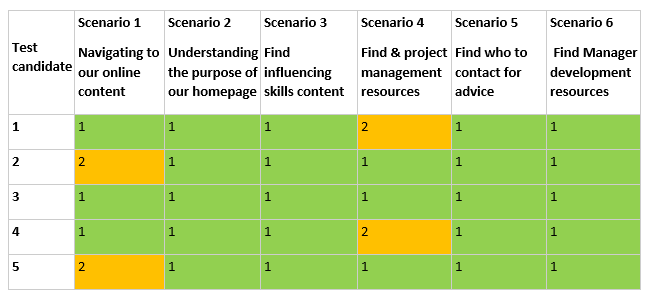
To validate our assumption that we should start by fixing these problems, we ran some usability testing. I’d highly recommend doing this. It involves getting users into a room and asking them to do some typical tasks on your system. We watched, took notes and gave them a score of 1-3 depending on how easily they could complete the task. An ‘X’ means they couldn’t do it at all.

Here’s how people got on:


People used these words to describe the page:
 

And the pages scored an overall usability score of 44.5/100. To put this in context, average is 68 and an ‘A grade’ user experience (UX) is 80.


4. Designed some new content

So we knew we needed to improve our pages. We used a digital copywriting technique, ‘KFC’ (Know, Feel, Commit). This was new to our team, and having got over the Zinger Burger cravings, we now swear by it.

First write down on post it notes everything you want your user to ‘Know, Feel and Commit to’, as a result of reading your content. Stick the post its up in a table on a flipchart.

Next, take all the post its from the ‘Know’ and ‘Commit’ columns and plot them on a Business/ User need grid.

Here’s what we put together for our new home page:


Focus: high user need and high business need
This stuff should go at the top of your page.

Guide: high user need, lower business need
This stuff should go second highest on your page.

Drive: high business need, lower user need
This stuff should go third highest on your page. You want them to read or do it, but it’s not primarily what they’re looking for.

Meh: low user & low business need
This stuff should go at the very bottom. It isn’t useful to anyone but has to be included, like terms and conditions.


5. Went where our users were

We had to work out where to host our content. To this point we’d had everything on a Sharepoint site dedicated to learning. But we decided to change to the place we knew that our users go most and feel most comfortable. To reduce the separation between 'learning' and 'work'. As David James puts it in  this post:

"It is often confused that L&D's clients are Learners, when in fact they are Workers."

We’re lucky to have a trusted intranet that’s been built with users in mind and has great search capability. It's hosted on the content management system, Drupal. So we tested what would happen if we put our new content on the intranet.

To give an idea of how much we changed things, here’s the home page that we started with:


And here's what it looks like now:


6. Usability tested again

Our hunch was that the new pages would be easier to find and more usable. We ran some more usability testing to find out. And we saw a massive improvement:


People used these words to describe the page:


And the overall usability increased to 77.9/100, well above average and not far off the UX gold standard of 80. A great improvement from a couple of weeks’ work.


7. Writing for the web

We’re now improving the rest of our pages using the KFC process and the tips that we’ve learned from our digital content team.

Before we start on content for any topic, we get hold of a list of people we know have come to a session on that topic. We ask them what they wanted to learn and why. Their answers help us structure our content by what our users want to hear, rather than by what we want to tell them.

An example from our personal resilience page:


What’s next?

We know from our testing that our pages are now easier to find and more usable. So people waste less time searching for learning content, and can spend more time doing jobs to help beat cancer sooner. Early signs are that more people are accessing the pages too. We're gathering qualitative feedback and continually improving the content.

We're also looking at learning management systems to help us recommend content and training to staff. But any new system needs to enhance the existing user journey, not replace it. It has to work for the user or there's little point in having it.

As anyone who’s read anything by Jane Hart will know, modern workplace learning is much more than making existing learning opportunities ‘digital’. We need to help people take control of their own learning, not wait for it to be arranged for them.

All of our content aims to encourage this kind of behaviour. It won’t get us there on its own, but it will help if it’s easy for our users to find and easy for them to use.

Ed Willis
Learning Designer

Tuesday, 2 January 2018

Writing for the Web at Cancer Research UK

A few weeks ago at Cancer Research UK we had the 200th person attend our ‘Writing for the Web’ course. After celebrating with a ticker-tape parade and a commemorative Twix, it got me reflecting on the course, and why we started running it in the first place.

We’ve written a bunch of stuff about our digital devolution model, and how we aim to make digital a core part of everyone’s job at the charity. And a key part of this is how we communicate our brand online.

So my team started a 2 hour workshop for anyone who publishes content on our website. And, because we have the skills to deliver this internally, it means we can be flexible and run the course as often as needed - without spending money on external training providers.

So what’s covered?

Write the way your users read

Most people get that print and digital content are different. We understand that reading this blog on an iPhone is a fundamentally different experience than reading an article on copywriting in a magazine. 

But, what we sometimes don’t recognise is that as readers, we have fundamentally different attitudes to how we approach content in print and digital. 

Someone much smarter than me called Jakob Nielsen did a bunch of research using eye tracking software to record how people read content online.

He found that, whereas with traditional print content we (in European languages at least) read left to right and top to bottom, in digital we tend to scan around the page in more of an ‘F’ shape.


As users we go to websites with a specific problem, and we’re scanning the page to get the ‘gist’ of how well the page we’re on will solve that problem for us.

So our content needs to make it clear to users how we’re meeting their needs at a glance. They won’t take the time to wade through irrelevant or hard to understand information to get what they’re looking for. If they aren’t convinced our content will help them they’ll just leave.

Which is why we need to make it clear how our content will benefit our users.  

Write for your users, not for you

There’s an old saying in copywriting, “features tell, but benefits sell”. The idea is that just explaining what your product or service is won’t engage your users. Instead you need to explain how it will make your users’ lives better.

This is the most important thing about writing for digital. If you can relentlessly focus on how your content is going to help your users, rather than how your content is going to help your organisation, it’s the quickest way to improve its performance.

So what does this look like?

Well, imagine for a second you’re a humble pie maker, who wants to promote a competition on your website, www.piespiespies.com. 


You might use this as your opening line:

To celebrate 10 years in business, we’re running a competition to win free pie for a year.

Here, the focus is very much on your business. It’s a statement of fact, and it’s written from the perspective of your business. It’s feature-led.

Now imagine an alternative opening line:

Win free pie for a year with our anniversary competition.

Here the focus is on what the competition will do for your user. Does your user care that your business has been around for 10 years? Probably not. Do they care about free pie? Well, who doesn’t? So this sentence is more benefit-led.

Ok, great - but why is this important?

Well, think about it in context of scan reading. If a user’s quickly skimming your page, you’ll want to draw their attention to relevant content as quickly as possible. And they’re much more likely to engage if they can see, at a glance, what’s in it for them. 

Then, once we’ve got their attention, the next thing we need to do is make sure we express ourselves in a way that’s easy to understand. Which is where Plain English comes in. 

Write the way you talk 

Back when I started my career, I used to worry about how seriously people would take my writing. I used to think that to sound credible I needed to use lots of long, complicated words. After all, that would help me come across as smart and authoritative, right?

Well, actually, the opposite was true. By loading my writing with complicated phrases I wasn’t coming across as smart. I was coming across as confusing and difficult to understand.

Sarah Richards is another person much smarter than me, and she makes the point that writing in Plain English isn’t dumbing down content, it’s opening it up. Because if we know our users scan information online, and we know they react better to clear, benefit-led sentences, then why wouldn’t we try and make our writing as clear and concise as possible? 

At Cancer Research UK, our guidance on Plain English is pretty straightforward:
  • Keep your sentences short (20 words max) 
  • Use a maximum of 3 sentences per paragraph
  • Only discuss 1 thing per paragraph (it’s easier to scan that way)
  • If you have the choice between a long word, and a short word that means the same thing, then always pick the short word
If in doubt, a good rule of thumb is ‘write the way you speak’. This doesn’t mean talking the same way you would to your friends at Friday night drinks. Instead, think about how you’d explain your content to your users over a coffee and a Twix. What words would you use? How would you speak? 

I imagine you’d be friendly, straightforward and to the point. I also imagine you wouldn’t use phrases like ‘for further information please direct any inquiries to our helpline’. I mean, you might, but you’d come across as slightly robotic if you did.

A great tool you can use to check how clear your writing is, is Hemingway App. It’s a free, online word processor, so you can type straight into your browser window. And, as you type, Hemingway grades how easy your writing is to understand and suggests improvements. The lower the score the better, and if you aim for a score between 6 and 8 you’ll find your content is doing pretty well.

Write better by writing more often

This is just a snapshot of the content training we offer at Cancer Research UK, and as far as content strategy goes it’s one piece of the wider puzzle.

Before you sit down and create your content you’ll need to make sure it answers a clear user and business need. You’ll need to make sure it has appropriate governance so it doesn’t all fall apart once it’s been published. And you’ll need to make sure you regularly test it so you know it’s still doing the job it should.

However, what this training does give teams is a solid grounding in the skills they need for writing for the web. Will they create world class digital content straight away? Well, probably not – it’s kind of hard to after a 2 hour introduction course. 

But writing something that’s a solid base is a great first step. Then based on users’ feedback you can always improve, iterate and optimise your content over time. Plus, bear in mind the only way you’ll become a better writer is by writing. And if your content is in plain, straightforward English that speaks to your users’ needs, it’ll already be better than a lot of content online. 

Chris Flood
Content Strategy Lead

Tuesday, 2 May 2017

Building digital confidence at Cancer Research UK

Back in wintry January we wrote our first blog post about how we’re building the digital skills and knowledge of people at CRUK through our hub and spoke model. We’re doing this to become a more digital organisation and to keep moving towards 3 in 4 people surviving cancer by 2034.

When our digital team works with another team at CRUK in a ‘spoke’, we help them deliver a digital outcome. Like increase their digital presence or the performance of their pages.  And just as importantly we help them learn new digital skills and ways of working. This way we’re developing our staff and becoming a more digital organisation at the same time.

But we haven’t stopped there. We’ve provided lots of other ways for people to build their digital skills and confidence.


Digital Talent Development
Through our Digital Champions scheme, we’re giving more digital responsibility to teams across the charity. Following some introductory awareness building workshops with each of our digital Practice Leads (UX, Agile, content, SEO, analytics, production and proposition management), we’ve matched each of our 16 champions with a digital mentor. The mentors help the champions work out an individual digital personal development plan. And offer face to face training to build their confidence.


Senior marketers can attend our Modern Marketing Academy. Over 8 weekly sessions we’ve challenged our marketers to diversify their channels and test more ideas. We've used internal and external inspiration. Including a trip to our UX lab to observe some live usability testing, a speed meeting session with a range of media owners and an analytics and measurement workshop with the help of our in house analytics team. And we saw a big increase in participants' confidence levels. The group reported a commitment to making a change in their area of responsibility of 4.7/5. And they’ve made some important changes. Like setting digital development objectives, building test and learn strategies and introducing UX tools for marketing.


We also run a regular programme of training on everything from agile to UX. We support this with twice weekly ‘Digital Hour’ drop-in sessions. Anyone can come and chat to a generalist producer or a specialist in content, SEO, agile, UX or analytics. It’s working well as a training refresher, a way to get advice on a new idea or a way to get a quick digital task done to a high standard.


Some success stories
Many of the talented people whose digital skills we’ve helped build are creating real change. Several teams have reviewed their structures to make digital more prominent. And to encourage more innovative, ‘test and learn’ ways of working. A member of our internal communications team, Joe, learnt lots about digital while on a spoke. His team have now reshaped his role to make the most of his new skills. He’ll now be leading a review of all of our internal digital platforms and developing a strategy to ensure we’re gaining maximum value from them.

Freya, in our research innovation team, has also been on a spoke. Her team recognised the need to retain and challenge her, to harness her new digital skill and awareness. She’s recently gained a Head role, from which she can encourage digital ideas and ways of working.

Our goal? 3 in 4…
Our digital talent development strategy allows people to get things done quicker and with less support from digital. We’re building the digital capability of our great people so that we can move at pace and make sure that we reach 3 in 4 people surviving cancer by 2034.

Are you doing something similar? Taking a different approach to building digital skills where you work? It would be great to hear from you!

Ed Willis
Learning and Development Manager, Digital team

Tuesday, 28 March 2017

Being a digital generalist in a world full of specialists

I'm Becky and I'm a Digital Producer at Cancer Research UK. You're probably thinking "What's a Digital Producer?". People often don't understand what we do. Our job title is pretty vague. But that's because we're digital 'generalists'.

Back in the early days of the web everyone was a generalist ("Webmaster"): but it became apparent fairly quickly that there's more to creating and running a website than just buying a URL, sticking up some content and clicking publish. There's now a huge variety of ways you can become a digital specialist, from developing to diving into analytics - but being a generalist, like a Producer, is still a skill in itself.

What is a Producer anyway?

Producers have a broad understanding of all the digital disciplines and, while our role is difficult to summarise, we basically help teams understand what a good digital experience is and how to deliver it for their users.

We're responsible for working with our colleagues across the organisation to produce user-centric content, campaigns and products that meet the highest digital standards, follow best practice and represent our brand.

On a day-to-day basis we can be found:
  • creating or amending content on our content management systems
  • setting up and measuring tests
  • facilitating user testing/interviews
  • analysing metrics
  • writing user stories
  • finding great imagery and optimising it for the web
  • copywriting for the web
  • training people on all of the above, both formally and informally, and
  • supporting colleagues from across the organisation during Digital Hour, which I'll touch on later in this post

Team work makes the dream work

Of course we can't do all this by ourselves.

While we have knowledge of things like UX, wireframing, accessibility, content strategy, HTML, SEO, analytics and product development, we're part of a cross-discipline team which includes skilled specialists in these areas and part of our role involves knowing when to call in the experts, utilising their in-depth knowledge so we can make our digital offering the best for our users (and learn ourselves at the same time!).

Greg already shared how we communicate with each other, using software like Slack and Trello, and these free tools are vital in making sure we can work with our colleagues quickly and effectively. We also have regular stand ups and demos where we show what we've been up to and what we've discovered, so we're sharing knowledge, reducing duplication and all learning together.

Variety is the spice of life 

If you talk to anyone in my team, you'll quickly find the thing we like most about our job is that we get to be involved in everything. Really, everything.

We're constantly learning and having the chance to experience working across all the digital disciplines means we can find out what we'd like to specialise in in the long-term. Since I joined the team, just 10 months ago, I've seen 3 Producers move on to UX and Product Management roles. Getting involved is encouraged at Cancer Research UK - and it's really fun to have such a varied role!

We're also helping the organisation become more digitally empowered, which is saving money that can instead go towards our life-saving cancer research. For example, as part of a spoke to improve prospective volunteers' online experience, we built a registration of interest form so that specialists who want to share their experience in things like finance and photography can give us their details: we've seen 4 times as many registrations as we expected and these volunteers are potentially worth a staggering £3m a year.

Training and support

For colleagues who want to improve their digital skillset, the production team hold regular Introduction to Drupal training and, of course, offer ad-hoc help, guidance and support.

We also host Digital Hour twice a week, where people can drop in and see us with queries or refreshers on quick Drupal tasks, such as how to upload a web-optimised image and ensure it has an appropriate alt tag.

Besides the buzz we get from knowing we're benefiting the charity, one of the best things about being a Producer is getting to work with people across the organisation, helping them to realise all the ways in which being more digital can benefit them, the organisation and their users. It's incredibly rewarding and exciting.

Becky Colley
Digital Content Producer

Thursday, 12 January 2017

Becoming digital masters to beat cancer sooner

At Cancer Research UK our goal is that by 2034, 3 in 4 people diagnosed with cancer will survive. That’s rightly ambitious and we need to keep moving forwards to make sure we get there. We need to become a more digital organisation to keep pace.

It sounds good in theory. We hear that we’re supposed to be ‘more digital’ all the time. Organisations can’t keep doing things the way they’ve always done them. Or they risk being ‘disrupted’. Left behind, eating the dust of an army of post-it wielding hipsters.

But for people who don’t work in digital every day we know this can all feel a bit abstract. That’s our priority as a Learning and Development function within the digital team. How do we help people understand what ‘being more digital’ is? And how do we support them to get there?

Digital mindset and skills
We describe ‘being digital’ as a combination of mindset and skills. Mindset-wise it’s about making sure you really understand your audience and prioritise their experience. It’s about testing and learning. Embracing failure, and continuously improving whatever it is that you're working on. And it’s about collaborating. Avoiding unnecessary hierarchy and bureaucracy in order to get work done quickly.

And the skills? Being able to write great web content that comes up top in a Google search. Being able to track and analyse the performance of web pages. Continuously improving pages to ensure a great experience for users. Understanding social and other digital marketing channels. And managing work in an 'agile' way and applying 'lean' principles to reduce waste and be as productive as possible.

Learning by doing
So how do we work with teams so that they can do all these things?
At the moment, the Learning and Development world is buzzing with ideas about modern workplace learning. Jane Hart and others are leading a shift away from the traditional training course, where ‘learning’ is separate from work.
Nowadays if I wanted to find out how to do something outside of work I’d Google or YouTube it to find out how. Or I’d ask someone who knows more than me. I wouldn’t book onto a training course in a month’s time.
We take this kind of approach to digital upskilling. We see work and learning as one and the same thing.
As a wider digital team, we no longer do the digital stuff for other teams. Through our ‘Hub and Spoke’ model, we (the digital hub) work in partnership with teams (in what we call spokes) to deliver a digital outcome. Like increase the team's digital presence or increase the engagement of people who visit their pages. And just as importantly, to help the team adopt a digital mindset and develop their digital skills.
We don’t send people on a one-size-fits-all training programme to make them better at digital things. Instead we support teams to learn as they work towards their spoke goal. 
At the start of a spoke, teams assess their current skills and set some learning objectives with a digital team member (a Proposition Manager) who acts as their learning guide throughout. We’ve created a digital skills self- assessment to help them do this. We can share this with you if you’re interested.
They then get started on the digital work they’ve come together to deliver. Working with the Proposition Manager to build their understanding of how to approach a piece of work in a digital way.
The team can ask questions as they go, and get guidance and advice from digital experts in our team. When relevant they can go to focused training sessions and have access to the helpful just-in-time resources.
So at the end of a spoke, a previously ‘non-digital’ business team can test new ideas from their audience’s point of view, maintain their web page and create great online experiences. And they can do all this independently, needing less and less support from the digital team.

For example: Our Annual Review team
A spoke was set up to make sure we have outstanding content on the Annual Review pages of our website.
Oli Welch, a Proposition Manager, guided the team through this journey. So that they could keep improving their pages in future, once the spoke ended.

Skills assessment
Firstly, Oli needed to establish the team’s starting point. In this case they were all quite new to digital but were really keen to learn. Ideal!

Learning to use some analytics and collaborative tools
Next the team needed to learn how supporters were using the Annual Review pages. Oli showed them how to use Google Analytics and Crazy Egg. Google Analytics let them track some key statistics about their users and Crazy Egg allowed them to see visually how people engage with their website. These tools gave them a much better idea of how people interacted with their pages.
The team practised with the tools until they were able to use them confidently on their own.
Oli also introduced the team to tools like Trello, a platform for managing workload in an agile way, to share their work. The team picked them up quickly and have continued to use them since.

A lightbulb moment
Oli introduced the team to the concept of User Experience (UX). They went along to our testing lab at City University, to observe real people engaging with their existing pages. They watched as members of the public skimmed through pages they’d expected them to read in detail and didn’t even open the pdfs they’d painstakingly put together! It really challenged their preconceptions about how people interacted with their content and the difference between what works in print and what works online.

Reflecting and Consolidating
All of the work so far allowed the team to put together a list of things that were wrong with the existing pages and things that were working well. They could begin creating new content.
But before ploughing on, Oli held a couple of washup sessions with the team. He reminded them of everything they’d learned. And gave them a handy document explaining who to ask in digital for help with different tasks.

Learning from experts
Next came workshops with our Content and SEO leads, Chris Flood and Nancy Scott. They gave some tips for creating a new user journey and ideas for writing great web content. The team now keep these in mind when they produce new content.

Pressing the right buttons
To put the new pages on the website, the team needed to know how to use our content management system (CMS), Drupal. Becca Sharplin-Hughes, one of our Digital Producers built a page as an example, showing them the steps she took to do it. Then the team were able, with Becca’s support, to create their own pages. With more practice, they’ve grown in confidence and can now edit their pages by themselves.

From zero to digital 
So through a mixture of learning by doing, speaking to experts, and training, the team grew to adopt a digital mindset and developed the skills to take control of their digital destiny.
We’re seeing some exciting progress working with teams across CRUK in this way. Helping them to deliver great digital experiences and supporting them to become more digital in the process.

Ed Willis
Digital Training and Comms Manager